Video production used to mean lights, cameras, actors, and hours in editing software. Today, you can create compelling video content by typing a few sentences. AI video generation has democratized motion content, and you do not need technical expertise to get started. This guide walks you through the three core methods, with practical tips that work on your first try.
1. Text-to-Video: Creating Motion from Words
Text-to-video generates complete video clips from written prompts. This is your go-to method when you need scenes that do not exist in real life, or when you want total creative control without filming.
How it works: You describe what you want to see, and the AI generates every frame of video based on that description. The result is a seamless clip with consistent motion and lighting.
- Basic prompt: "A cyberpunk street"
- Effective prompt: "A camera flying through a rainy neon alleyway in Tokyo at night, reflections on wet pavement, cinematic lighting, drone shot perspective"
Camera movement keywords that actually work:
- Zoom: "zoom in on the character's face"
- Pan: "pan across the landscape"
- Drone shot: "aerial view flying over the city"
- Tracking shot: "follow the car as it drives down the road"
- Slow motion: "slow motion shot of water splashing"
Model recommendations:
- Google Veo 3.1: Maximum cinematic quality with perfect object consistency. Use for professional projects where every frame must look flawless.
- Google Veo 3.1 Fast: Same quality architecture, optimized for speed. Perfect for social media content and rapid iteration.
- Kling 2.5 Turbo Pro: Excellent balance of quality and generation speed. Great for daily content creation workflows.
💡 Pro tip: Generate 3-5 variations of the same prompt. Small random differences in AI generation can produce dramatically better motion or composition in one version versus another.
2. Image-to-Video: Bringing Still Photos to Life
If you already have an image you love, image-to-video animation adds motion while preserving the exact style and composition you created. This method is faster than text-to-video and gives you pixel-perfect control over the starting visual.
Common use cases:
- Animate product photos for e-commerce (make steam rise from coffee, water ripple in a glass)
- Add subtle motion to AI-generated art (leaves rustling, clouds drifting)
- Create looping backgrounds for presentations or social posts
- Bring character illustrations to life with breathing or blinking
"Take a static image of a mountain landscape and prompt 'gentle clouds drifting across the sky, subtle wind through pine trees.' The AI adds natural, looping motion that feels alive without changing your original composition."
Best practices for image animation:
- Start with high-resolution images: 1024x1024 or larger gives the AI more detail to work with
- Be specific about motion type: "subtle," "gentle," and "slow" prevent jarring or unnatural movement
- Keep prompts short: Focus on the motion you want, not re-describing the entire image
- Test short clips first: Generate 2-3 second samples before committing to longer durations
3. Transition Videos: Morphing Between States
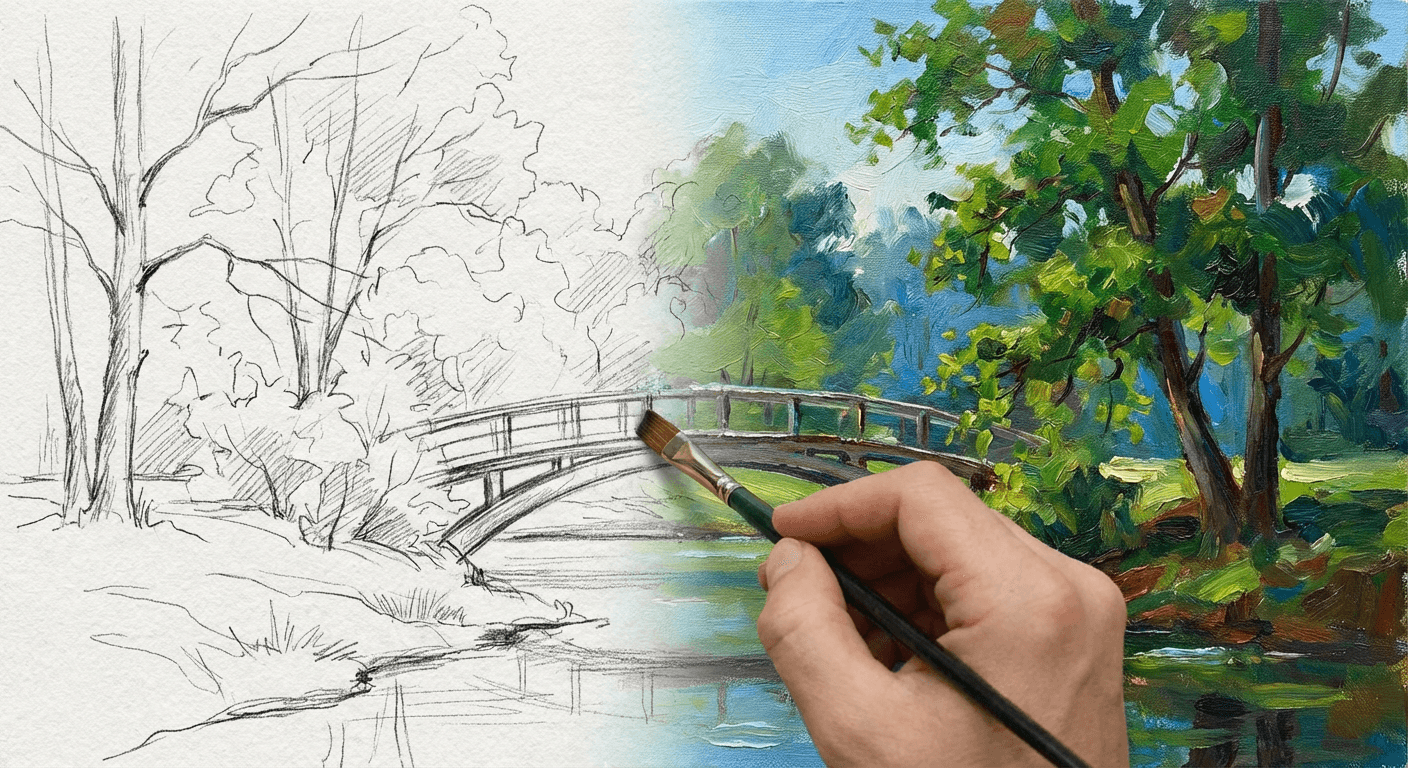
Transition videos take two images and generate the in-between frames that smoothly transform one into the other. This creates mesmerizing effects that are impossible to achieve with traditional editing.
Powerful transition examples:
- Sketch to finished painting (perfect for showing creative process)
- Winter landscape to summer (seasonal marketing content)
- Day to night (time-lapse effect without filming)
- Young face to old (aging visualization for storytelling)
- Before and after product shots (transformation reveals)
Tips for smooth transitions:
- Match composition: Both images should have similar framing and perspective
- Keep subjects consistent: The same object or character should appear in both images
- Avoid extreme changes: Gradual transformations work better than completely different subjects
- Experiment with duration: Longer transitions (8-12 seconds) feel more cinematic
4. Choosing the Right Video Model for Your Project
Not all video models are created equal. Each excels at specific types of motion:
- Google Veo 3.1: Best for cinematic scenes with complex lighting and object interaction. Use when visual fidelity is non-negotiable.
- Seedance 1.0 Pro: Specializes in human motion. Choose this for dance sequences, character performance, or any video featuring people moving naturally.
- Hailuo 2.3 Standard: Atmospheric and mood-driven scenes. Excellent for fog, rain, golden hour, and environmental effects with stable object persistence.
- Kling 2.5 Turbo Pro: Fast turnaround for social media content. Great balance of quality and speed for daily posting workflows.
- Wan 2.5: Narrative-driven scenes with integrated audio generation. Use for complete storytelling where sound and motion work together.
5. Common Beginner Mistakes to Avoid
Even experienced creators fall into these traps. Learn from others' mistakes:
- Overly long prompts: Video models work best with focused, specific instructions. Keep prompts under 3 sentences when possible.
- Expecting perfect human motion from general models: Veo and Kling handle environments beautifully but struggle with complex human movement. Use Seedance for people-centric videos.
- Skipping test generations: Always generate a short sample before committing credits to a full-length video.
- Ignoring aspect ratio: Specify 9:16 for TikTok/Reels, 16:9 for YouTube, or 1:1 for Instagram feed posts.
- Forgetting about audio: Video without sound feels incomplete. Use Wan 2.5 for integrated audio, or add music in post-production.
6. Practical Workflow: From Idea to Published Video
Follow this step-by-step process for consistent results:
- Define your goal: What emotion or action should this video trigger?
- Choose your method: Text-to-video for original scenes, image-to-video for existing art, transitions for transformations.
- Pick the right model: Match your content type to the model's specialty (see section 4).
- Write your prompt: Be specific about subject, style, motion, and camera movement.
- Generate 3-5 variations: Compare results and select the best motion quality.
- Refine if needed: Adjust prompt based on what worked or did not work in first attempts.
- Add finishing touches: Trim clips, add music, include captions for accessibility.
- Publish and analyze: Track engagement to learn what resonates with your audience.
Why Video Content Matters Now
Social media algorithms prioritize video because it keeps users engaged longer. A moving image stops scrolling in a way that static posts cannot. But beyond algorithms, video communicates emotion and story more effectively than text or images alone.
You do not need a film degree or expensive equipment. With AI video generation, the bottleneck is no longer technical skill. It is creativity and clear communication. The tools are here. The only question is what you will create with them.
Ready to turn your ideas into motion? Start creating AI videos today.